> For the complete documentation index, see [llms.txt](https://weplanx.gitbook.io/latest/llms.txt). Markdown versions of documentation pages are available by appending `.md` to page URLs; this page is available as [Markdown](https://weplanx.gitbook.io/latest/extend/schedule.md).
# Schedule
[](https://github.com/weplanx/schedule/actions/workflows/release.yml) [](https://github.com/weplanx/schedule/releases) [](https://github.com/weplanx/schedule) [](https://goreportcard.com/report/github.com/weplanx/schedule) [](https://raw.githubusercontent.com/weplanx/schedule/main/LICENSE)
Schedule message event publishing node
## Pre-requisite
* Nats cluster needs to enable JetStream
* Services and applications should work together the same nats tenant
* Each node defines a NODE name that is unique, through which Schedule will be assigned to the node
## Deploy
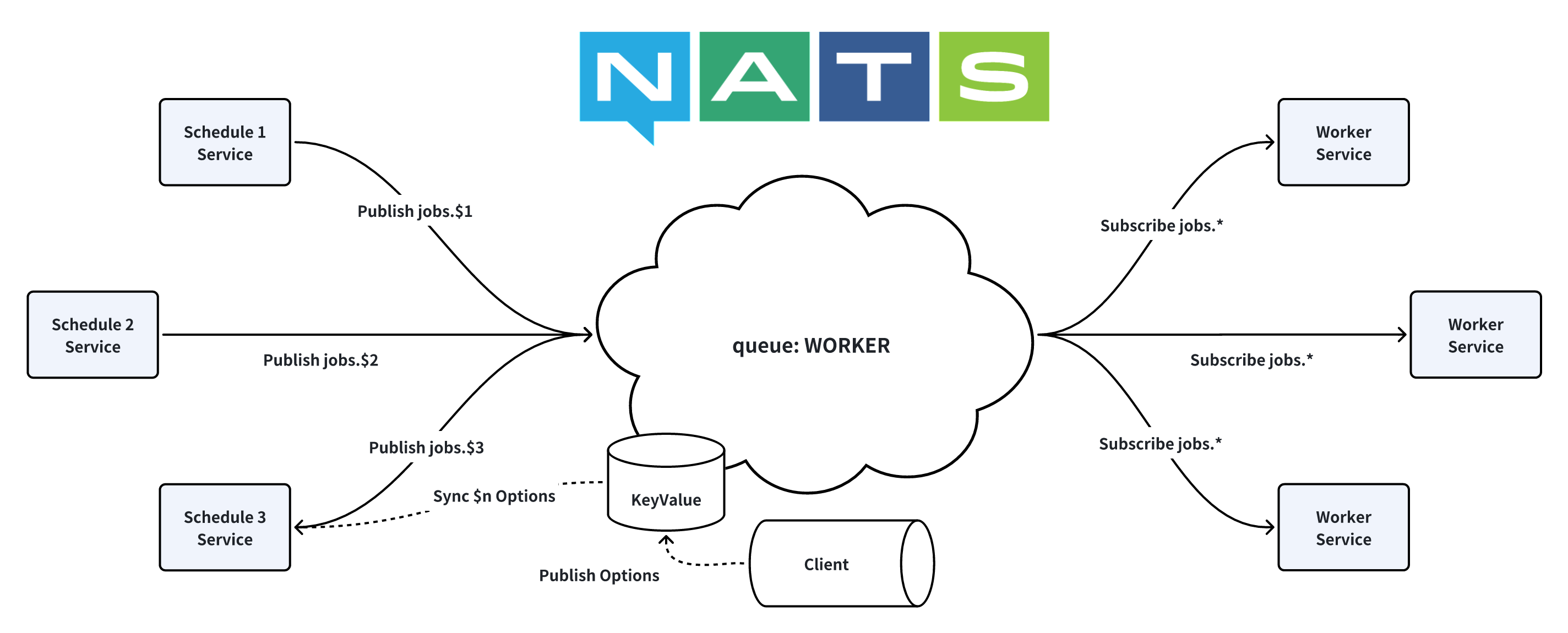
The principle of the Schedule service is to publish the job message sync up to the worker node cluster. Multi-node can improve the number of tasks and disaster recovery.
The main container image is:
* ghcr.io/weplanx/schedule:latest
* registry.cn-shenzhen.aliyuncs.com/weplanx/schedule:latest
The case will use Kubernetes deployment orchestration, replicate deployment (modify as needed).
```yaml
apiVersion: apps/v1
kind: Deployment
metadata:
name: schedule-0
spec:
selector:
matchLabels:
app: schedule
template:
metadata:
labels:
app: schedule
spec:
containers:
- image: registry.cn-shenzhen.aliyuncs.com/weplanx/schedule:latest
imagePullPolicy: Always
name: schedule
env:
- name: MODE
value: release
- name: NODE
value: "0"
- name: NATS_HOSTS
value: <*** your nats hosts ***>
- name: NATS_NKEY
value: <*** your nats nkey***>
```
## Environement
### MODE
* Working mode, default `debug`
### NODE \*required
* Node name
### NATS\_HOSTS \*required
* Nats connection host, use `,` split
### NATS\_NKEY \*required
* Nats NKEY authentication
## Client
The client end for managing Schedule configuration, installed in the application:
```shell
go get github.com/weplanx/schedule
```
### Initialize
```go
// Create the schedule client
if x, err = client.New(node, nc); err != nil {
panic(err)
}
```
### Set
```go
err := x.Set("api", common.ScheduleOption{
Status: false,
Jobs: []common.ScheduleJob{
{
Mode: "HTTP",
Spec: "*/5 * * * * *",
Option: common.HttpOption{
Method: "GET",
Url: "https://dog.ceo/api/breeds/image/random",
},
},
},
})
```
### Status
```go
r, err := x.Ping()
```
### List Keys
```go
keys, err := x.Lists()
```
### Get Info
```go
jobs, err := x.Get("api")
```
### Start or Stop
```go
err := x.Status("api", true)
err := x.Status("api", false)
```
### Remove
```go
err := x.Remove("api")
```
## License
[BSD-3-Clause License](https://github.com/weplanx/schedule/blob/main/LICENSE)